Installing it, the Yield Slider, and the MCP server.
Everything on this page is optional reading. The short version: install the file, restart Anki, done. Back to the download.
Three parts, one file.
Decks land in Anki silently
When Engram V finishes a deck, it hands the file to the Companion and the cards appear in your collection - no Import window, no clicking through. Later, when you mark cards as reviewed in Engram V's audit view, those marks are written back onto the same cards.
The Yield Slider
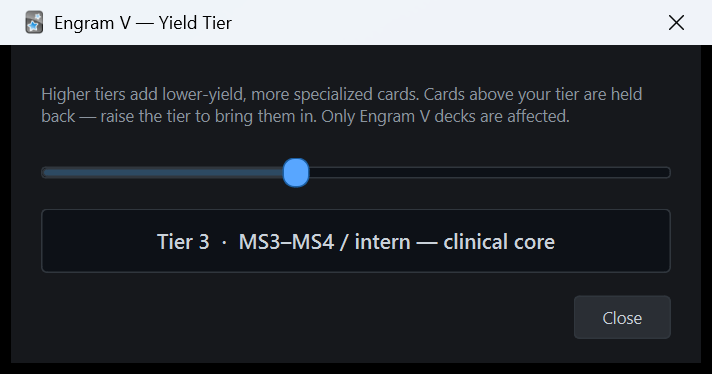
Every Engram V card carries a level, 1 to 6. Open Tools ▸ Engram V - Yield Slider, set your level, and every card above it is suspended; slide up later to bring them in. It only touches cards Engram V made - the rest of your collection is left alone.
Your AI can read your decks
A local MCP server on your own machine. Point Claude Desktop, Claude Code, or any MCP client at it and the AI can search your cards, read your review history, list your decks - and, if you ask, suspend, bury or tag cards. Nothing leaves your computer.
One file, one restart.
If you use the Engram V desktop app, you can skip this: the app installs and updates the Companion for you from its own Settings. This page is for installing it by hand - on a second machine, on a Mac, or if you only want the Yield Slider and the MCP server.
Download
Get engram-v-companion.ankiaddon. It is a plain zip of Python files - unzip it and read it if you like.
Install from file
In Anki: Tools ▸ Add-ons ▸ Install from file… and pick the file. Double-clicking the file also works on most installs. Anki will ask you to confirm - add-ons are code, so it always asks.
Restart Anki
Add-ons load at startup. After the restart the Tools menu shows Engram V - Yield Slider and Engram V - MCP server status. That's it.
Where it runs
The add-on is pure Python with no compiled parts and nothing bundled, so the same file runs in the Python that Anki itself ships with - on every platform Anki ships for. I have run it in hand on Windows 11 ARM64 with Anki 25.02.4; the other rows are true by construction, not by my having sat at those machines yet. If it misbehaves anywhere, email me.
- TestedWindows 11 on ARM64 - Anki 25.02.4 (the x64 build, which Windows runs under emulation).
- RunsWindows 11 on ARM64 - the native ARM64 Anki that exists since 26.05. No compiled code, so nothing to break.
- RunsWindows 10/11 x64 - Anki 25.02 through 26.08.
- RunsmacOS, Apple silicon and Intel - Anki 25.02 through 26.08 (Anki's own macOS minimum applies).
- RunsLinux - the same Anki releases.
- NoteAnki 25.02 embeds Python 3.9; 25.07 and later embed 3.13. The add-on is written for 3.9 and up, so both work.
Study at your level. Unlock depth when you're ready.
Engram V tags every card it writes with a level from 1 to 6. The slider suspends every card above the level you choose and unsuspends everything at or below it, so a first-year is not drilling cards meant for an attending. It applies when you let go of the handle, remembers where you left it, and shows a count of what is active and what is held back.
- 1MS1 - preclinical foundations
- 2MS2 - preclinical board core
- 3MS3–MS4 / intern - clinical core (the default)
- 4Attending
- 5Specialist
- 6Seasoned specialist
It finds Engram V cards by their EngramV::yield::N tag. Cards without that tag - everything else in your collection - are never touched.
Let the AI you already pay for read your Anki.
While Anki is open, the Companion runs a Model Context Protocol server at http://127.0.0.1:8767/mcp. Any MCP client on your computer can connect to it - and the AI does the thinking on your existing subscription. Engram V has no part in the conversation and no per-question fee. It listens on your machine only (127.0.0.1) and refuses requests from web pages, so nothing on the internet can reach it.
Seven read-only tools
find_cards (Anki's own search syntax), get_card, get_deck_tree, get_review_history, get_due_cards, search_text, get_collection_stats.
Four reversible edits
suspend_cards, unsuspend_cards, bury_cards, add_tag. That is the whole list. It cannot delete, edit, or move cards; everything it can do is undone from Anki's Browse window.
Anki has to be open
The server lives inside Anki, so it exists only while Anki is running with a profile loaded. When it isn't, the Claude Desktop bridge below still answers - it tells Claude to ask you to open Anki instead of just failing.
Connecting
Install the bridge
Claude Desktop only launches local connectors as programs, so there is a tiny bridge: download engram-v-anki-bridge.mcpb and open it with Claude Desktop (or Settings ▸ Extensions ▸ Advanced settings ▸ Install Extension…). Claude Desktop ships its own Node.js, so there is nothing else to install. The bundle is not code-signed yet, so Claude Desktop may show a warning.
One command
claude mcp add --transport http anki http://127.0.0.1:8767/mcp - then claude mcp list shows it connected while Anki is open. The Code tab inside Claude Desktop reads the same setting.
Any MCP client
Point it at http://127.0.0.1:8767/mcp (Streamable HTTP; the current 2026-07-28 protocol and the earlier handshake versions are both spoken). Very old clients can use http://127.0.0.1:8767/sse. A client that only launches programs can use npx mcp-remote http://127.0.0.1:8767/mcp if you have Node installed.
What does not work, and why: claude.ai in a browser and the Claude phone app connect to servers from Anthropic's cloud, and the cloud cannot reach a server on your laptop. That is a limit of where the server lives, not a setting.
Four settings, and you'll probably touch none of them.
Tools ▸ Add-ons ▸ select Engram V Companion ▸ Config. import_port (8766) is where Engram V pushes decks; mcp_port (8767) is the MCP server; mcp_enabled turns the MCP server off entirely if you never want it; yield_tier is where the slider was last left. Changes take effect the next time Anki starts. Removing the add-on removes everything - it keeps no files elsewhere.
- Add-onengram-v-companion-0.2.0.ankiaddon - 26 KB
- Bridgeengram-v-anki-bridge-0.2.0.mcpb - 7 KB, for Claude Desktop
- SumsSHA256SUMS.txt
- Version0.2.0 - 15 August 2026. Replaces the 0.1.x Companion, whose MCP server never actually started inside Anki (it depended on a Python newer than the one Anki 25.02 embeds); 0.2.0 has no dependencies at all.
Free means free: no account, no key, no telemetry in the add-on, and no charge ever. The Engram V app itself is a one-time purchase; the Companion is not part of that price.